Breadboard Layout
Experimental
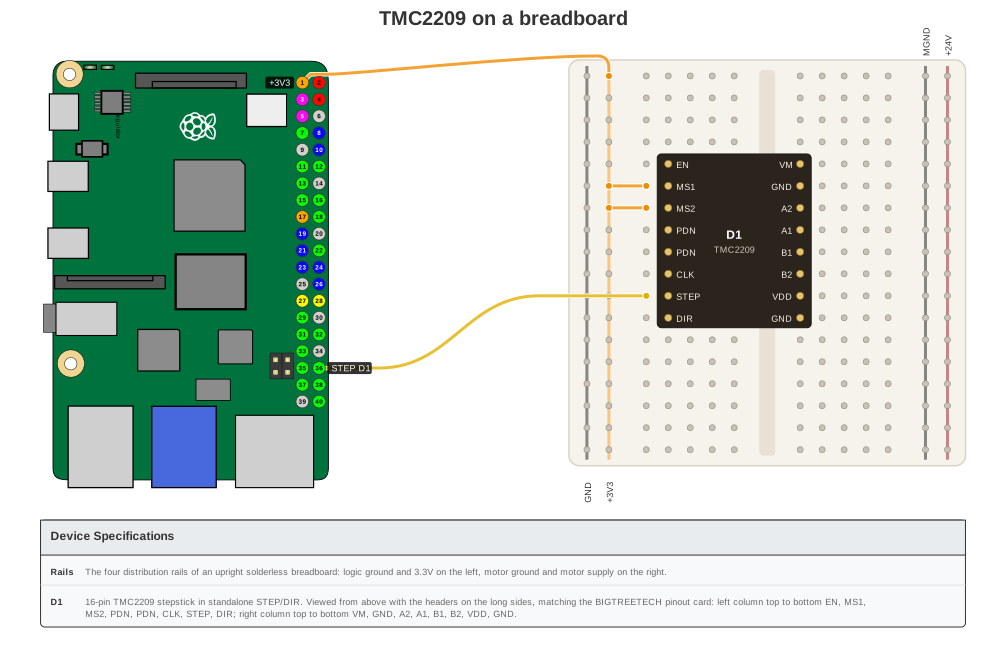
The breadboard layout currently draws a TMC2209 stepstick on a Raspberry Pi 4 or 5. Other boards and module types fail with an error. The schematic layout is unchanged and remains the default.
Overview
layout: breadboard draws the board artwork beside an upright solderless breadboard. Plug-in modules
sit on its holes and colored jumper wires run between the real pins.
title: "TMC2209 on a breadboard"
board: raspberry_pi_4
layout: breadboard
show_legend: true
devices:
  - type: breadboard_rail
    name: Rails
  - type: tmc2209
    name: D1
connections:
  - {board_pin: 1, device: Rails, device_pin: "+3V3"}
  - {board_pin: 36, device: D1, device_pin: STEP}
  - from: {device: Rails, device_pin: "+3V3"}
    to: {device: D1, device_pin: MS1}
See examples/breadboard_stepstick.yaml for a complete example.
A full build with three stepsticks, NEMA 17 motors, a 24 V supply and a smoothing capacitor
(examples/breadboard_three_motors.yaml):
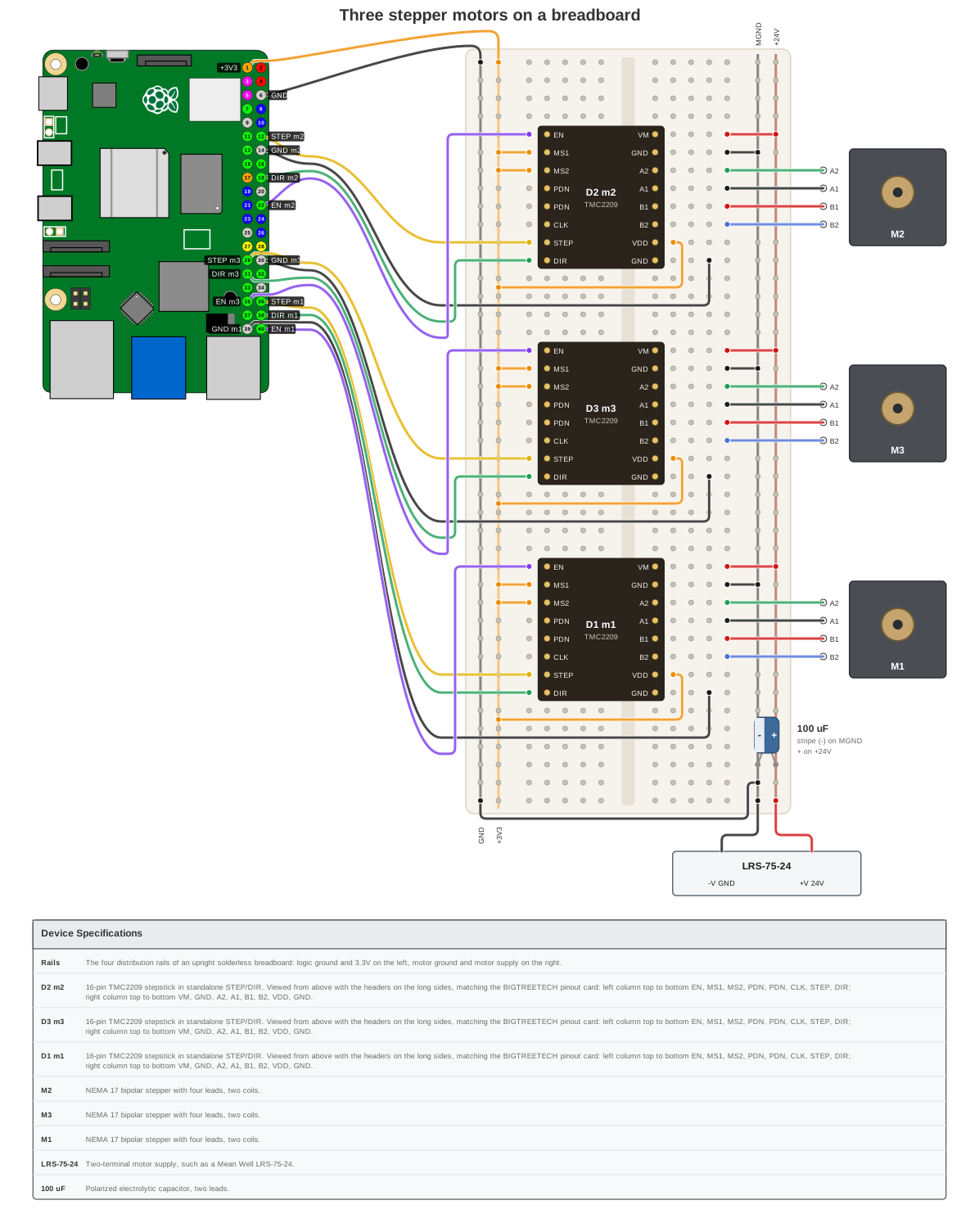
Dark theme (theme: dark) is supported too: see docs/assets/breadboard/three-motors-dark.svg.
Devices
| Type | Default role | Notes |
|---|---|---|
tmc2209 |
module |
16-pin stepstick straddling the trench (BIGTREETECH V1.3 pin order) |
nema17 |
motor |
Four coil leads, drawn beside its module |
psu_24v |
supply |
Motor supply, feeds the +24V and MGND rails |
electrolytic |
capacitor |
Polarized; plugs into two rails with the stripe on the negative leg |
breadboard_rail |
rail |
GND, +3V3, MGND, +24V strips |
Each device takes its role from its type. Override it, or pin a module to a row, with a breadboard key:
- type: tmc2209
  name: D2
  breadboard: {row: 16}   # first pin row; rows must be at least 8 apart and start at 3 or later
A custom inline device has no type to infer a role from, so it must set one. A custom motor works with any
pin names; supply expects pins +V/-V and capacitor expects +/-:
Behavior
- Modules stack top to bottom in YAML order. List them in header order to keep wire ribbons from crossing.
themeandshow_legendare honored.show_legenddraws the same "Device Specifications" table as the schematic layout.- The title, header pin-number circles, wire styling and font sizes match the schematic layout. Labels use pin names as written in the device configs (
+3V3,MGND,+24V). - Each header pin that carries a wire gets a small tag with its net (
STEP m2,GND,+3V3), in the schematic's pin-label style, next to its own pin. The supply box shows the rail each terminal feeds (-V GND,+V 24V). - A wire without
colortakes the default color for its pin role. - Logic ground and motor ground rails are tied at the bottom of the board when motor ground is used.
Errors
Rendering fails with a message for: a board that is not a Pi-style 40-pin header, a device type the layout cannot draw, overlapping or too-high module rows, a capacitor missing a leg, and any device with no connection.
External power
The motor supply pins (psu_24v.+V, tmc2209.VM, the +24V rail) use the EXT_POWER pin role.
Validation reports an error if one is connected to a board 3V3 or 5V pin.
MCP server
Not available through the MCP server. Prompt-based generation always produces the schematic layout, and the MCP device database is a separate curated list that does not include these parts.