Raspberry Pi Examples
Examples for Raspberry Pi 5 and Raspberry Pi 4 boards.
→ All examples index | Components | Pico | ESP32/ESP8266 | Multi-Tier
Wire Visibility - Light & Dark Colors
Demonstrates PinViz's intelligent wire visibility system that automatically ensures all wire colors remain visible against white backgrounds. Light-colored wires receive dark halos, while dark wires keep traditional white halos.
Configuration: examples/wire_visibility.yaml
title: "Wire Visibility - Light & Dark Colors"
board: "raspberry_pi_5"

devices:
  - name: "Light Colors Device"
    description: "Demonstrates automatic dark halos for light-colored wires"
    pins:
      - name: "WHITE"
        role: "GPIO"
      - name: "LIGHT_GRAY"
        role: "GPIO"
      - name: "PALE_YELLOW"
        role: "GPIO"
      - name: "CREAM"
        role: "GPIO"

  - name: "Dark Colors Device"
    description: "Shows traditional white halos for dark-colored wires"
    pins:
      - name: "BLACK"
        role: "GPIO"
      - name: "DARK_RED"
        role: "GPIO"
      - name: "NAVY"
        role: "GPIO"
      - name: "FOREST"
        role: "GPIO"

connections:
  # Light colored wires - automatically get dark gray halos
  - board_pin: 1
    device: "Light Colors Device"
    device_pin: "WHITE"
    color: "#FFFFFF"  # Pure white

  - board_pin: 3
    device: "Light Colors Device"
    device_pin: "LIGHT_GRAY"
    color: "#F0F0F0"  # Light gray

  - board_pin: 5
    device: "Light Colors Device"
    device_pin: "PALE_YELLOW"
    color: "#FFFFE0"  # Pale yellow

  - board_pin: 7
    device: "Light Colors Device"
    device_pin: "CREAM"
    color: "#FFFACD"  # Lemon chiffon

  # Dark colored wires - keep traditional white halos
  - board_pin: 11
    device: "Dark Colors Device"
    device_pin: "BLACK"
    color: "#000000"  # Black

  - board_pin: 13
    device: "Dark Colors Device"
    device_pin: "DARK_RED"
    color: "#8B0000"  # Dark red

  - board_pin: 15
    device: "Dark Colors Device"
    device_pin: "NAVY"
    color: "#000080"  # Navy blue

  - board_pin: 19
    device: "Dark Colors Device"
    device_pin: "FOREST"
    color: "#228B22"  # Forest green

show_legend: true
Generate:
Result:
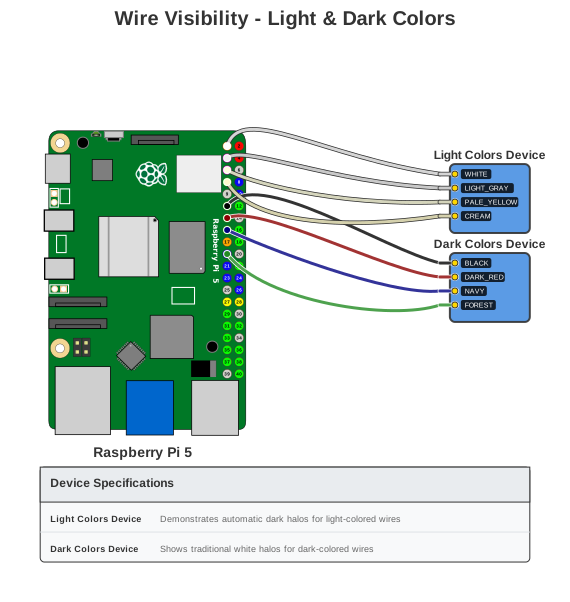
How it works: PinViz calculates color luminance using the WCAG 2.0 formula. Colors with luminance > 0.7 (very bright) get a dark gray halo (#2C2C2C); all others keep the traditional white halo. No configuration needed — it works automatically for all custom wire colors.
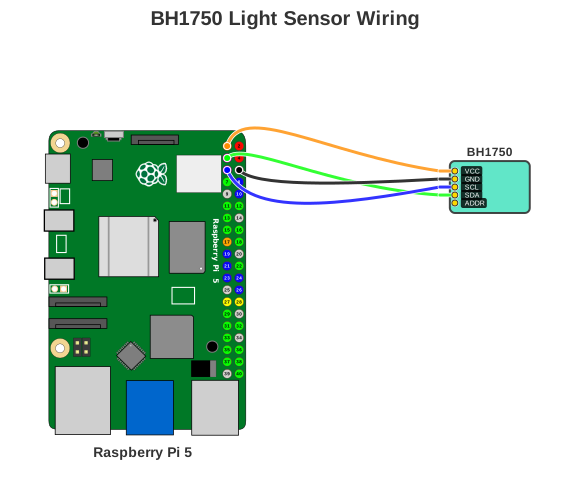
BH1750 Light Sensor
Simple I2C sensor connection demonstrating automatic color coding for I2C bus (SDA/SCL).
Configuration: examples/bh1750.yaml
title: "BH1750 Light Sensor Wiring"
board: "raspberry_pi_5"

devices:
  - type: "bh1750"
    name: "BH1750"

connections:
  - board_pin: 1    # 3V3
    device: "BH1750"
    device_pin: "VCC"

  - board_pin: 6    # GND
    device: "BH1750"
    device_pin: "GND"

  - board_pin: 5    # GPIO3 (I2C SCL)
    device: "BH1750"
    device_pin: "SCL"

  - board_pin: 3    # GPIO2 (I2C SDA)
    device: "BH1750"
    device_pin: "SDA"
Generate:
Result:
Traffic Light
Multiple LEDs with individual resistors demonstrating parallel device connections.
Configuration: examples/traffic_light.yaml
title: "Traffic Light - 3 LEDs with Resistors"
board: "raspberry_pi_5"

devices:
  - type: "led"
    color: "Red"
    name: "Red LED"
  - type: "led"
    color: "Yellow"
    name: "Yellow LED"
  - type: "led"
    color: "Green"
    name: "Green LED"

connections:
  # Red LED (GPIO17)
  - board_pin: 11
    device: "Red LED"
    device_pin: "+"
    color: "#FF0000"
    components:
      - type: "resistor"
        value: "220Ω"
  - board_pin: 9
    device: "Red LED"
    device_pin: "-"
    color: "#000000"

  # Yellow LED (GPIO27)
  - board_pin: 13
    device: "Yellow LED"
    device_pin: "+"
    color: "#FFFF00"
    components:
      - type: "resistor"
        value: "220Ω"
  - board_pin: 14
    device: "Yellow LED"
    device_pin: "-"
    color: "#000000"

  # Green LED (GPIO22)
  - board_pin: 15
    device: "Green LED"
    device_pin: "+"
    color: "#00FF00"
    components:
      - type: "resistor"
        value: "220Ω"
  - board_pin: 20
    device: "Green LED"
    device_pin: "-"
    color: "#000000"
Generate:
Result:
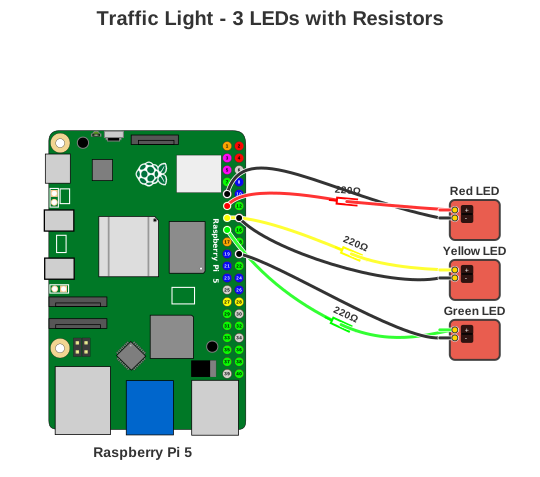
Key Features: Multiple devices of the same type, each with its own resistor, color-coded wires matching LED colors.
Multi-Device Setup
BH1750 light sensor and IR LED ring demonstrating I2C bus sharing and custom wire colors.
Configuration: examples/bh1750_ir_led.yaml
title: "BH1750 Light Sensor + IR LED Ring"
board: "raspberry_pi_5"

devices:
  - type: "bh1750"
    name: "BH1750 Light Sensor"
  - type: "ir_led_ring"
    name: "IR LED Ring"

connections:
  # BH1750 Light Sensor
  - board_pin: 1
    device: "BH1750 Light Sensor"
    device_pin: "VCC"
    color: "#FF9800"  # Orange
  - board_pin: 9
    device: "BH1750 Light Sensor"
    device_pin: "GND"
    color: "#FFEB3B"  # Yellow
  - board_pin: 3
    device: "BH1750 Light Sensor"
    device_pin: "SDA"
    color: "#4CAF50"  # Green
  - board_pin: 5
    device: "BH1750 Light Sensor"
    device_pin: "SCL"
    color: "#2196F3"  # Blue

  # IR LED Ring
  - board_pin: 2
    device: "IR LED Ring"
    device_pin: "VCC"
    color: "#F44336"  # Red
  - board_pin: 6
    device: "IR LED Ring"
    device_pin: "GND"
    color: "#000000"  # Black
  - board_pin: 11
    device: "IR LED Ring"
    device_pin: "EN"
    color: "#F44336"  # Red
Generate:
Result:
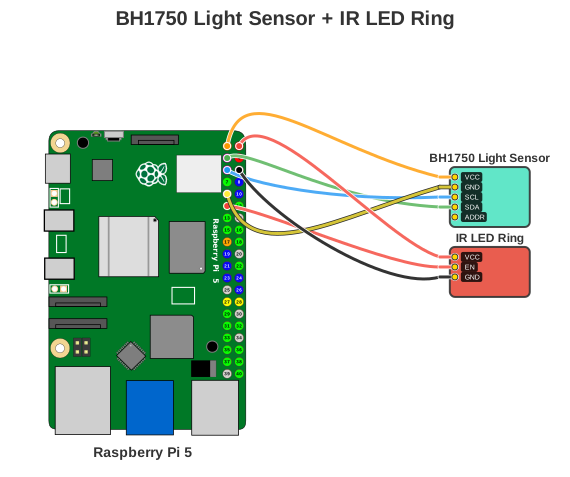
Key Features: Two different device types, I2C bus + GPIO-controlled device, custom color palette for wire differentiation.
Device Specifications Table
Add a specifications table to your diagrams using the --show-legend CLI flag. This displays detailed information about each device below the diagram.
Result:
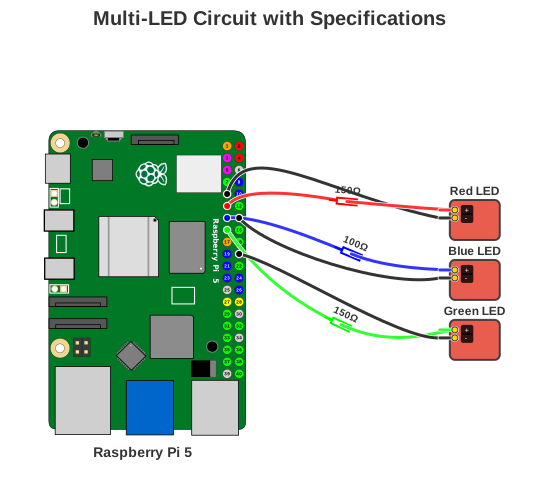
Configuration: examples/leds_with_specs.yaml
title: "Multi-LED Circuit with Specifications"
board: "raspberry_pi_5"

devices:
  - type: "led"
    name: "Red LED"
    description: "Kingbright WP7113ID, 5mm, Vf: 2.0V, If: 20mA, 625nm"
    color: "Red"

  - type: "led"
    name: "Blue LED"
    description: "Lite-On LTL-4221N, 3mm, Vf: 3.2V, If: 20mA, 470nm"
    color: "Blue"

  - type: "led"
    name: "Green LED"
    description: "Kingbright WP7113SGC, 5mm, Vf: 2.2V, If: 20mA, 525nm"
    color: "Green"

connections:
  # Red LED (GPIO17) with resistor
  - board_pin: 11
    device: "Red LED"
    device_pin: "+"
    color: "#FF0000"
    components:
      - type: "resistor"
        value: "150Ω"
  # ... additional connections ...
The table is only shown when --show-legend is passed or show_legend: true is set in YAML. Device descriptions in the description field populate the table automatically.
BH1750 Sensor (Dark Mode)
BH1750 I2C sensor with dark theme — optimized for dark backgrounds, presentations, and GitHub dark mode.
Configuration: examples/bh1750_dark.yaml
title: "BH1750 Light Sensor (Dark Mode)"
board: "raspberry_pi_5"
theme: "dark"

devices:
  - type: "bh1750"
    name: "BH1750"

connections:
  - board_pin: 1    # 3V3
    device: "BH1750"
    device_pin: "VCC"

  - board_pin: 6    # GND
    device: "BH1750"
    device_pin: "GND"

  - board_pin: 5    # GPIO3 (I2C SCL)
    device: "BH1750"
    device_pin: "SCL"

  - board_pin: 3    # GPIO2 (I2C SDA)
    device: "BH1750"
    device_pin: "SDA"
Generate:
pinviz render examples/bh1750_dark.yaml -o bh1750_dark.svg
# Or override theme via CLI flag
pinviz render examples/bh1750.yaml --theme dark -o bh1750_dark.svg
Result:
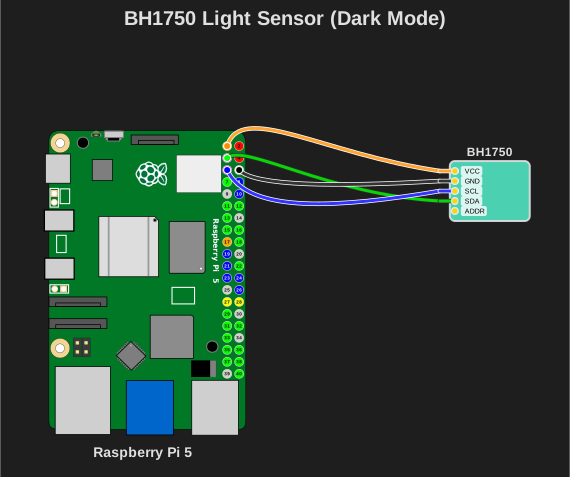
Dark canvas background (#1E1E1E), light text and strokes, wire colors unchanged (electrical conventions preserved). See the Themes Guide for all theme options.