CLI Usage
Command-line interface reference for PinViz.
Basic Usage
Commands
Render a Diagram
Generate a diagram from a YAML or JSON configuration file:
pinviz: command not found?
If you installed via uv add (library mode), prefix every command with uv run:
pinviz command without the prefix, reinstall with uv tool install pinviz.
Arguments:
CONFIG_FILE- Path to YAML or JSON configuration file
Options:
-o, --output OUTPUT_FILE- Output SVG file path (default:<config>.svg)--no-title- Hide diagram title--no-board-name- Hide board name label--show-legend- Show device specifications table below the diagram--theme {light|dark}- Override theme (light or dark)--max-complexity INTEGER- Maximum connections allowed (for CI/CD validation)--json- Output machine-readable JSON status
Examples:
# Generate diagram (output defaults to my-diagram.svg)
pinviz render my-diagram.yaml

# Specify custom output path
pinviz render my-diagram.yaml -o output/wiring.svg

# Dark theme with legend
pinviz render my-diagram.yaml --theme dark --show-legend

# Enforce complexity limit for CI/CD
pinviz render my-diagram.yaml --max-complexity 50

# Works with JSON too
pinviz render my-diagram.json -o output.svg
Complexity Checking:
PinViz automatically warns when diagrams become too complex:
- Warning at 30+ connections or 20+ devices
- Error if --max-complexity limit is exceeded
This helps maintain readable diagrams and prevent performance issues. For large projects, split diagrams into multiple files or increase the limit.
Generate Built-in Examples
Generate one of the built-in example diagrams:
Available examples:
bh1750- BH1750 I2C light sensorir_led- IR LED ring modulei2c_spi- Multiple I2C and SPI devicesesp32_weather- ESP32 weather station with BME280 and OLED
Options:
-o, --output OUTPUT_FILE- Output SVG file path (default:<name>.svg)--no-title- Hide diagram title--no-board-name- Hide board name label--show-legend- Show device specifications table below the diagram--theme {light|dark}- Override theme--json- Output machine-readable JSON status
Examples:
# Generate BH1750 example
pinviz example bh1750 -o bh1750.svg

# Generate IR LED example in dark theme with legend
pinviz example ir_led -o ir_led.svg --theme dark --show-legend

# Machine-readable output
pinviz example i2c_spi --json
Validate a Configuration
Check your diagram configuration for wiring errors and safety issues:
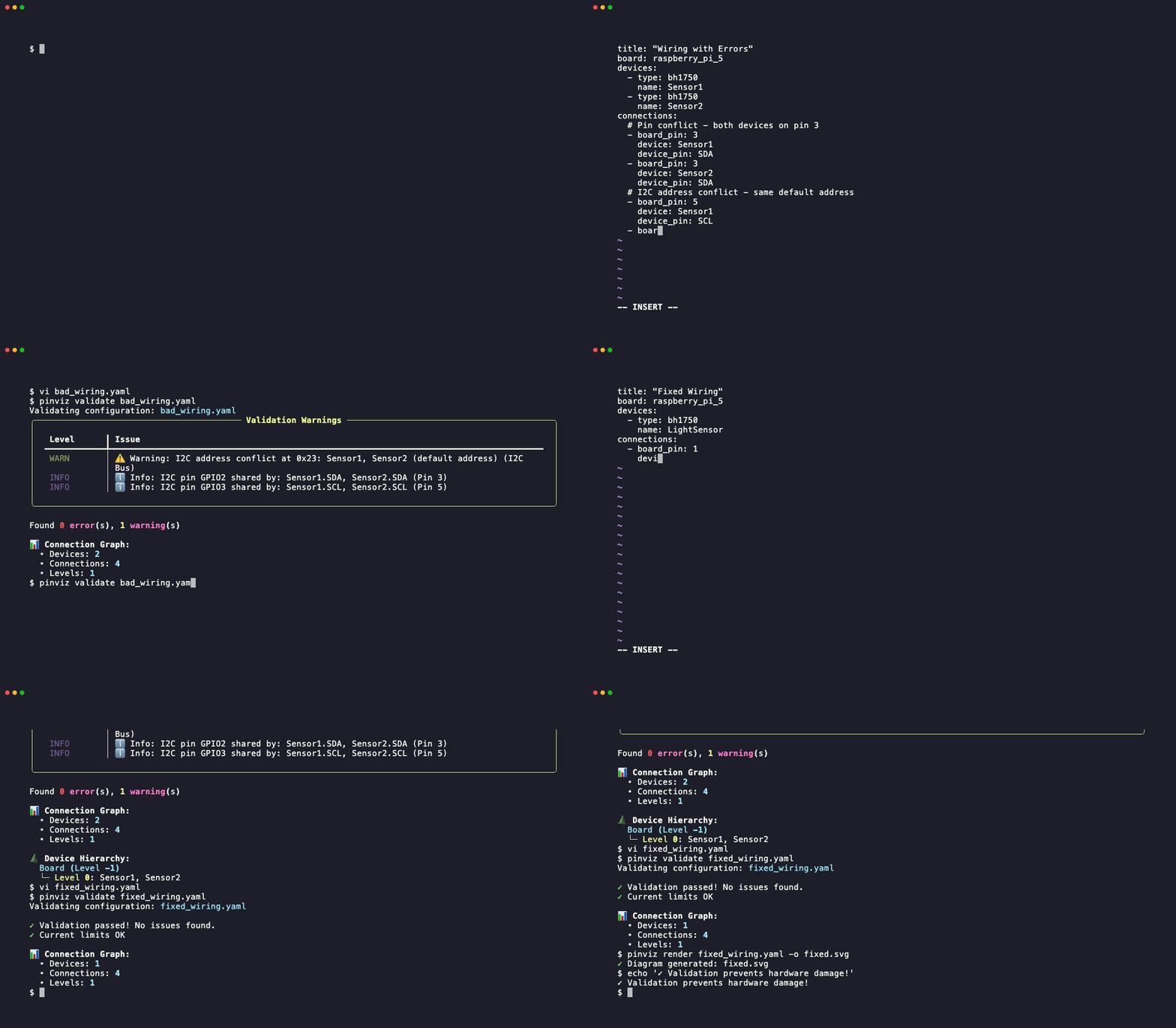
Arguments:
CONFIG_FILE- Path to YAML or JSON configuration file
Options:
--show-graph- Show connection graph visualization--strict- Treat warnings as errors (exits with code 1)--json- Output machine-readable JSON status
Examples:
# Validate diagram configuration
pinviz validate my-diagram.yaml

# Show the connection graph alongside validation results
pinviz validate my-diagram.yaml --show-graph

# Strict mode - warnings cause failure
pinviz validate my-diagram.yaml --strict

# Machine-readable output for CI/CD
pinviz validate my-diagram.yaml --json
Validation checks for:
- Duplicate GPIO pin assignments (ERROR)
- I2C address conflicts (WARNING)
- Voltage mismatches (ERROR/WARNING)
- GPIO current limits (WARNING)
- Invalid pins or devices (ERROR)
Common: duplicate GPIO pin error
If you see GPIO pin X is already assigned, two connections reference the same physical board pin.
Check your connections: list for repeated board_pin values. Each physical pin can only
be used once — except I2C/SPI bus pins, which can be shared if all devices on the bus
are properly configured.
The --show-graph flag renders the full connection graph, making duplicate paths easy to spot.
See the Validation Guide for detailed information.
List Templates
List all available board and device templates:
This displays:
- Available board templates (Raspberry Pi, ESP32, ESP8266)
- Available device templates
- Available example diagrams
Supported Boards:
raspberry_pi_5(aliases:rpi5) - Raspberry Pi 5 with 40-pin GPIO headerraspberry_pi_4(aliases:rpi4,pi4) - Raspberry Pi 4 Model B with 40-pin GPIO headerraspberry_pi_pico(aliases:pico) - Raspberry Pi Pico with dual-sided 40-pin headeresp32_devkit_v1(aliases:esp32,esp32_devkit) - ESP32 DevKit V1 with 30-pin dual-sided headeresp8266_nodemcu(aliases:esp8266,nodemcu) - ESP8266 NodeMCU with 30-pin dual-sided headerwemos_d1_mini(aliases:d1mini,wemos) - Wemos D1 Mini with 16-pin dual-sided headerraspberry_pi(aliases:rpi) - Default board (currently Raspberry Pi 5)
Add Device (Interactive Wizard)
Launch an interactive wizard to create a new device configuration:
Device files are lost on upgrade when installed with uv tool install or pipx
The wizard saves the JSON file inside the tool's isolated environment. When you run
uv tool upgrade pinviz or pipx upgrade pinviz, that environment is replaced and the
file is gone.
Before upgrading: copy the saved JSON to a safe location, then restore it afterwards:
# Find where it was saved (path printed by the wizard)
cp ~/.local/share/uv/tools/pinviz/.../pinviz/device_configs/sensors/dht22.json ~/my-devices/

# After upgrade: restore it
cp ~/my-devices/dht22.json $(python -c "import pinviz, pathlib; print(pathlib.Path(pinviz.__file__).parent / 'device_configs/sensors/')")
The safest long-term option is to contribute the device so it ships with PinViz.
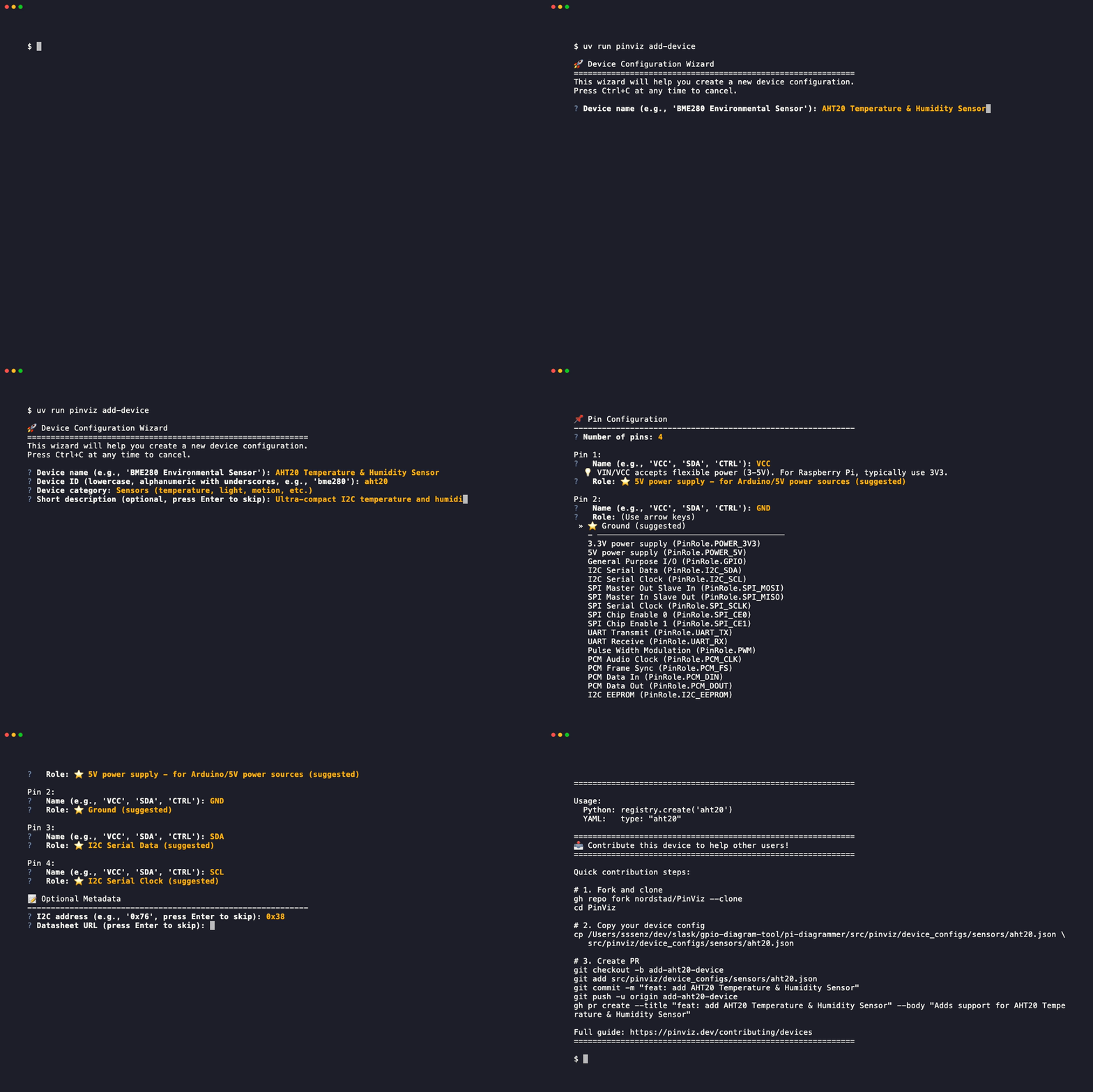
The wizard guides you through creating a device configuration with:
- Device name and identifier
- Category selection (sensors, LEDs, displays, io, etc.)
- Smart pin role suggestions based on pin names (VIN, SDA, SCL, MOSI, TX, etc.)
- Contextual hints for ambiguous pins
- Pin configuration with role assignment
- Optional metadata (I2C address, datasheet URL, notes)
- Automatic validation and testing
- Comprehensive wiring summary for Raspberry Pi
Example session:
$ pinviz add-device

🚀 Device Configuration Wizard
============================================================
This wizard will help you create a new device configuration.

? Device name: DHT22 Temperature Sensor
? Device ID: dht22
? Category: sensors
? Number of pins: 3

Pin 1:
  Name: VCC
  Role: 3V3

Pin 2:
  Name: DATA
  Role: GPIO

Pin 3:
  Name: GND
  Role: GND

? I2C address (optional): [press Enter to skip]
? Datasheet URL: https://www.sparkfun.com/datasheets/Sensors/Temperature/DHT22.pdf
? Setup notes: Requires 4.7-10kΩ pull-up resistor on DATA pin

📄 Configuration Preview
------------------------------------------------------------
{
  "id": "dht22",
  "name": "DHT22 Temperature Sensor",
  "category": "sensors",
  "pins": [
    {"name": "VCC", "role": "3V3"},
    {"name": "DATA", "role": "GPIO"},
    {"name": "GND", "role": "GND"}
  ],
  "datasheet_url": "https://www.sparkfun.com/datasheets/Sensors/Temperature/DHT22.pdf",
  "notes": "Requires 4.7-10kΩ pull-up resistor on DATA pin"
}

? Save this configuration? Yes

✅ Configuration saved to: src/pinviz/device_configs/sensors/dht22.json
🔍 Testing device configuration...
✅ Device loaded successfully
🎉 Success! Device 'dht22' is ready to use.

Usage:
  Python: registry.create('dht22')
  YAML:   type: "dht22"
Smart Pin Role Suggestions:
The wizard automatically suggests appropriate pin roles based on common naming patterns:
- Power pins: VIN, VCC, VDD → suggests 5V and 3V3
- Ground pins: GND, GROUND → suggests GND
- I2C pins: SDA, SCL → suggests I2C_SDA, I2C_SCL
- SPI pins: MOSI, MISO, SCLK, CS → suggests appropriate SPI roles
- UART pins: TX, RX, SERIAL_TX → suggests UART_TX, UART_RX
- Ambiguous pins: DIN, DOUT, SDI, SDO, CLK → suggests multiple roles with context
The wizard also provides inline contextual hints for ambiguous pins like: - VIN/VCC: Explains typical usage on Raspberry Pi (3.3V) - ADDR/A0: I2C address selection pins - DIN/DOUT: Data direction perspective
Suggestions work with: - Case insensitive: VIN, vin, Vin all match - Numbered pins: SCL1, SDA2, UART2_TX all match - Separators: VIN_POWER, SDA-LINE, I2C_SDA all match
Available pin roles:
3V3,5V- Power supplyGND- GroundGPIO- General purpose I/OI2C_SDA,I2C_SCL- I2C communicationSPI_MOSI,SPI_MISO,SPI_SCLK,SPI_CE0,SPI_CE1- SPI communicationUART_TX,UART_RX- UART serialPWM- Pulse width modulationPCM_CLK,PCM_FS,PCM_DIN,PCM_DOUT- PCM audio
Available categories:
sensors- Temperature, light, motion, etc. (color: turquoise)leds- LEDs and lighting (color: red)displays- OLED, LCD, etc. (color: blue)io- Buttons, switches, relays (color: gray)other- Custom devices
Where the file is saved:
The wizard saves the device JSON to PinViz's installed package directory, making
it immediately available via type: "<id>" in your YAML configs. The exact path
depends on how PinViz was installed:
uv tool install/pipx: saved inside the tool's isolated environment (e.g.,~/.local/share/uv/tools/pinviz/.../pinviz/device_configs/). The device works immediately but will be lost if you upgrade or reinstall PinViz. Keep a backup copy of the JSON file.- Development install (
uv sync): saved directly intosrc/pinviz/device_configs/in the repo, where it can be committed.
To share your device with all PinViz users, the wizard prints contribution steps at the end — or see the Contributing Guide.
Validate Device Configurations
Validate all device configuration files in the library:
Options:
--strict- Treat warnings as errors (exits with code 1)--json- Output machine-readable JSON status
Examples:
# Validate all device configurations
pinviz validate-devices

# Strict mode - warnings cause failure (useful for CI/CD)
pinviz validate-devices --strict

# Machine-readable output
pinviz validate-devices --json
Validation checks:
- Schema validation: Ensures all required fields are present
- Pin configuration: Validates pin names, roles, and layout parameters
- I2C address format: Checks I2C address syntax (0xXX format)
- Parameter definitions: Validates parameter types and defaults
- Duplicate device IDs: Ensures no duplicate device identifiers
Example output:
Validating device configurations...

✓ Validated 13 device configuration files
✓ No errors found
⚠ 1 warning

Warnings:
  src/pinviz/device_configs/leds/ir_led_ring.json: No datasheet URL provided

Summary:
  Total files: 13
  Valid files: 13
  Errors: 0
  Warnings: 1
This command is useful for:
- Contributors: Validate your device configuration before submitting a PR
- CI/CD pipelines: Add
--strictmode to fail builds on validation issues - Maintenance: Quickly check all device configs after schema changes
Global Options
--help- Show help message and exit--version- Show version and exit
The CLI produces quiet output by default, showing only essential messages and errors.
Exit Codes
0- Success1- Error (file not found, invalid configuration, etc.)2- Command-line usage error
Environment Variables
Currently, PinViz does not use any environment variables.