PinViz


Programmatically generate beautiful GPIO connection diagrams for Raspberry Pi and ESP32/ESP8266 boards in SVG format.
PinViz makes it easy to create clear, professional wiring diagrams for your microcontroller projects. Define your connections using simple YAML/JSON files or Python code, and automatically generate publication-ready SVG diagrams.
See It In Action
Quick Demo - CLI Usage

Features
- Declarative Configuration: Define diagrams using YAML or JSON
- Programmatic API: Create diagrams with Python code
- Automatic Wire Routing: Smart wire routing with configurable styles (orthogonal, curved, mixed)
- Inline Components: Add resistors, capacitors, and diodes directly on wires
- Color-Coded Wires: Automatic color assignment based on pin function (I2C, SPI, power, ground, etc.)
- Built-in Templates: Pre-configured boards (Raspberry Pi 4, 5, Pico, ESP32, ESP8266) and common devices (BH1750, IR LED rings, etc.)
- Hardware Validation: Catch wiring mistakes before building (pin conflicts, voltage mismatches, I2C address collisions)
- MCP Server: Generate diagrams using natural language with Claude (via Model Context Protocol)
- Structured Logging: Professional logging with contextual information using structlog
- SVG Output: Scalable, high-quality vector graphics
Example Diagrams
Raspberry Pi 5 - Multi-LED with Specifications
Three LEDs with inline resistors and detailed component specifications:
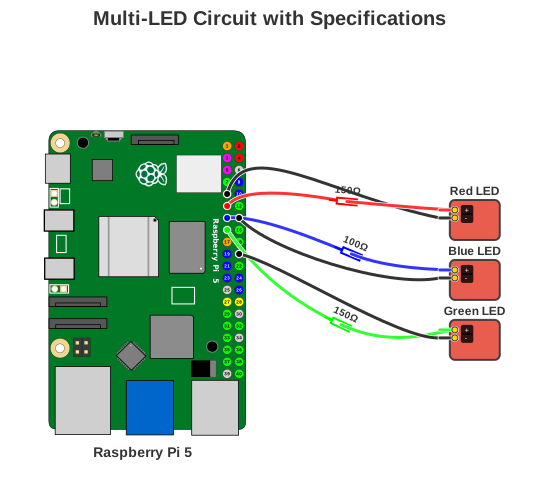
Key features: Raspberry Pi 5 board, inline resistors, specification table with part numbers
Raspberry Pi 4 - I2C + SPI Combo
OLED display (I2C) and accelerometer (SPI) demonstrating multiple protocol buses:
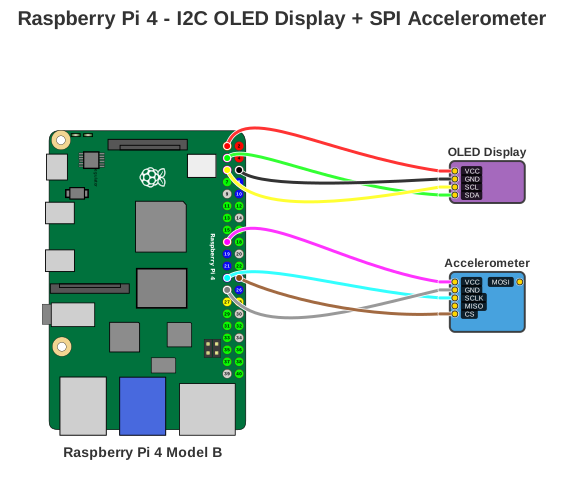
Key features: Raspberry Pi 4 board, I2C and SPI protocols, multi-device setup
ESP32 DevKit V1 - Weather Station
BME280 sensor and SSD1306 OLED display sharing the I2C bus, with smart pin assignment distributing ground connections automatically:
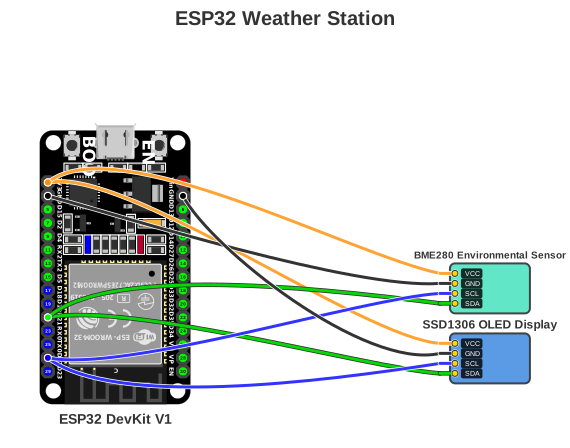
Key features: ESP32 DevKit V1 board, dual I2C devices, smart GND pin
distribution with board_pin_role
Raspberry Pi Pico - LEDs with Specifications
Three LEDs on Pico's dual-sided header with component specifications:
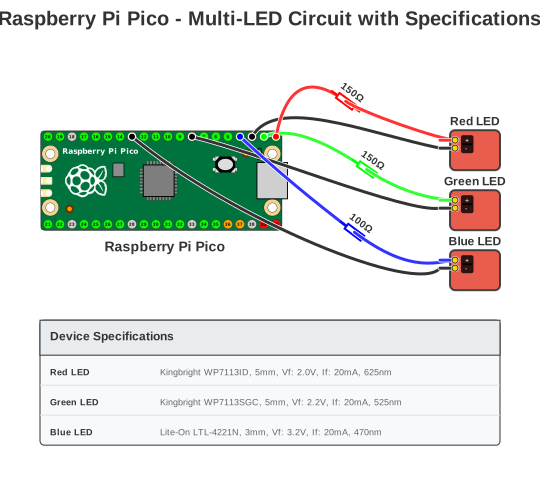
Key features: Raspberry Pi Pico board, horizontal pin layout, specification table
Minimal Diagram - No Headers
Clean diagram without title and board name labels:
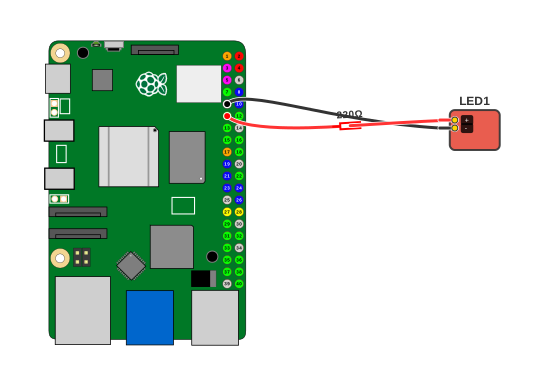
Key features: Minimal layout with show_title: false and
show_board_name: false
Quick Start
Installation
Using uv (recommended):
Using pip:
Your First Diagram
Create a configuration file my-diagram.yaml:
title: "BH1750 Light Sensor Wiring"
board: "raspberry_pi_5"

devices:
  - type: "bh1750"
    name: "BH1750"

connections:
  - board_pin: 1     # 3V3
    device: "BH1750"
    device_pin: "VCC"

  - board_pin: 6     # GND
    device: "BH1750"
    device_pin: "GND"

  - board_pin: 5     # GPIO3 (I2C SCL)
    device: "BH1750"
    device_pin: "SCL"

  - board_pin: 3     # GPIO2 (I2C SDA)
    device: "BH1750"
    device_pin: "SDA"
Generate the diagram:
What changed recently
v0.16.0 — ESP32/ESP8266 board support (ESP32 DevKit V1, NodeMCU, Wemos D1 Mini) and fully functional inline components (resistors, capacitors, diodes). Smart pin assignment (board_pin_role) for automatic GND/VCC distribution.
v0.16.1 — Bug fix: communication device category now passes validation; duplicate mcp3008.json removed.
See the full Changelog for details.
Next Steps
- Installation Guide - Detailed installation instructions
- Quick Start Tutorial - Step-by-step guide
- CLI Usage - Command-line interface reference
- Validation Guide - Hardware safety checks and error detection
- MCP Server - Natural language diagram generation with Claude
- Python API - Programmatic usage
- API Reference - Complete API documentation
License
MIT License - See LICENSE for details.
Contributing
Contributions are welcome! See our Contributing Guide for details.